Introduction
A year ago, if someone mentioned using vibe coding, many developers might have thought it was just another buzzword. It sounded a bit mystical, as if you could just throw your requirements at an AI and wait for the code to materialize. However, those who have actually tried it quickly realized that it’s not that simple. AI can write code, but it often misses the mark; it can fill in gaps but lacks knowledge of the project’s conventions; it can propose solutions, but when it comes to real repositories, it still gets bogged down by dependencies, context, testing, and historical baggage.
Looking at vibe coding today, its essence has changed. It’s no longer just about “let AI write a piece of code”; it has evolved into a new collaborative development approach: humans are responsible for determining direction, breaking down problems, and controlling quality, while AI is tasked with rapid exploration, generating drafts, reading context, and running validations. The most significant change isn’t that models have suddenly become omnipotent, but rather that people have begun to understand how to integrate it into real workflows.
Over the past year, my biggest takeaway is that vibe coding has shifted from a flashy gimmick to a practical tool. Previously, discussions often revolved around effect screenshots and one-liner project generations; now, the truly valuable questions have become: how to minimize rework, how to maintain control, how to ensure the maintainability of AI-generated code, and how to make it perform reliably within existing projects.
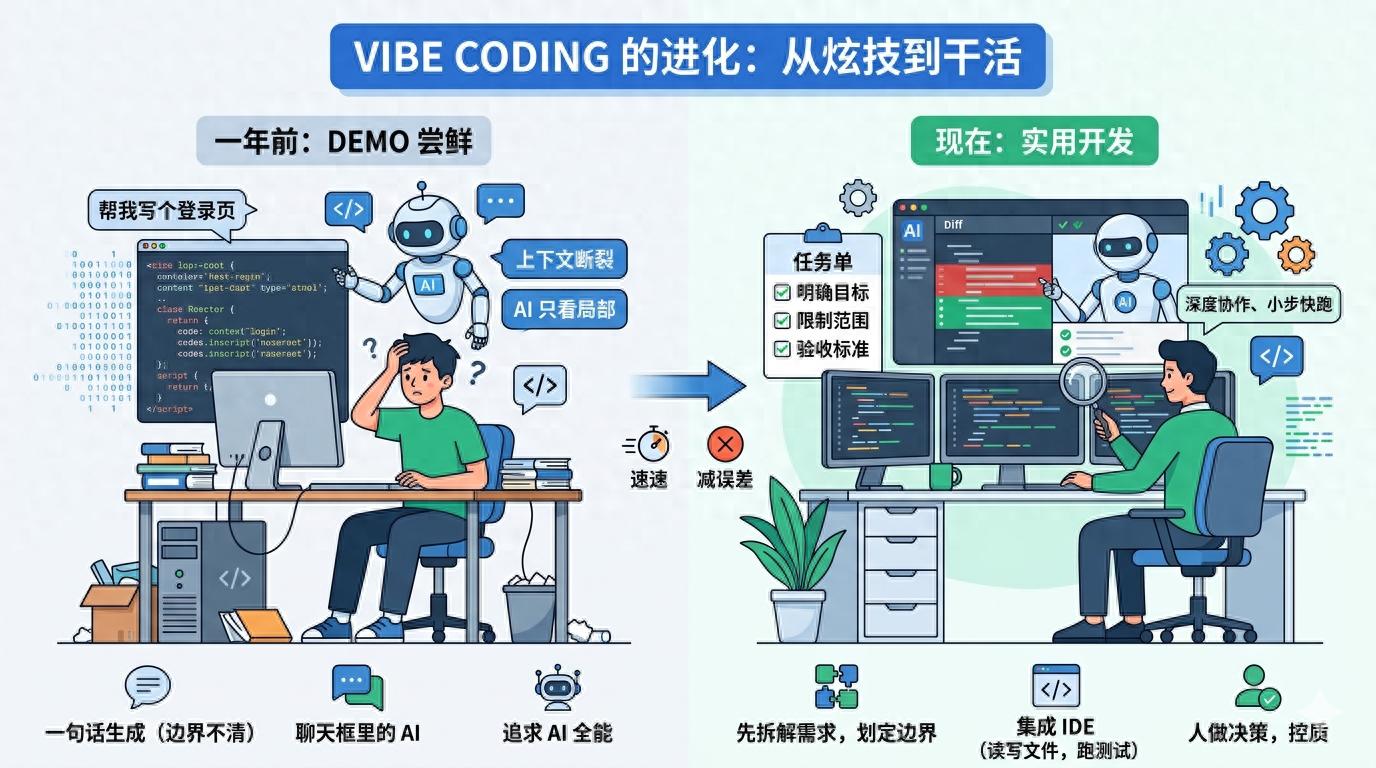
From One-Liner Generation to Clarifying Requirements
A year ago, many people liked to directly throw a one-liner at AI: “Help me create a login page,” “Help me write a web scraper,” or “Help me optimize this piece of code.” This approach looks great in demos but often fails in real projects because a one-liner usually only captures the result without detailing the boundaries.
For instance, when asked to “create a login page,” AI doesn’t know whether you’re using React or Vue, whether there are existing form components in the project, what the API response structure is, or if failure messages should follow a unified toast format. It will enthusiastically generate what seems like a complete solution, even introducing a new dependency you didn’t want. In the end, you might think you saved ten minutes, but you actually spent half an hour removing unnecessary parts.
The more mature approach now is to first have AI help clarify requirements rather than jumping straight to coding. For example, you might ask, “Based on the current project structure, what points need to be confirmed before modifying the login process?” or “Please read these files first and outline the minimum changes needed without writing code.” This step may seem slow, but it effectively reduces rework later on.
This shift is one of the biggest changes in vibe coding: previously, people treated AI as a typist; now, it’s more like a partner that can quickly read materials. Effective prompts have evolved from “help me implement a feature” to “first understand the existing implementation, then provide the scope of changes before proceeding.”
The Toolchain Has Changed: AI Is No Longer Just in the Chatbox
A year ago, many users were still stuck in the web chatbox scenario: copying code in, waiting for a response, and then copying it back. The main issue with this process is the disconnection of context. AI cannot see the entire repository, the test results, or know which files you modified recently. No matter how smoothly it responds, it’s like trying to fix a machine through glass.
Today, the change is that AI has started to integrate into editors, terminals, and project directories. Tools like Claude Code, Cursor, Cline, and Windsurf allow AI to read files directly, search references, modify code, and run tests. The efficiency boost in vibe coding often comes not from models writing more lines of code but from reducing the cost of “copying and pasting context.”
Previously, you had to spend a lot of time explaining: “This function is in file A, called in file B, and type definitions are in file C.” Now, it’s more common to let AI check for itself: “Search for where this interface is called and find the minimal modification path.” This leads to practical changes: AI is more likely to adhere to existing patterns in the project rather than inventing a new structure out of thin air.
Of course, this also introduces new risks. With AI able to modify files directly, the speed of errors has increased. Previously, it would just give you a piece of incorrect code; now it might change five files at once. Therefore, the key is no longer about whether to let AI write but rather how to clearly define its boundaries. For instance, explicitly instructing it not to add dependencies, not to refactor unrelated code, to provide a plan before making changes, and to run only relevant tests after modifications.
Efficiency Lies Not in Writing Code, but in Shortening the Trial-and-Error Path
Many misunderstand the value of vibe coding, thinking it lies primarily in “writing quickly.” However, writing code has never been the slowest part of development. What takes time is understanding where the problem lies, reading old code, experimenting between several solutions, and managing the chain reactions triggered by a change.
Over the past year, AI has genuinely begun to assist in these previously labor-intensive areas. For example, when taking over an unfamiliar repository, you might have had to navigate from the README, directory structure, and entry files. Now, you can let AI scan through routes, state management, API encapsulation, and test directories to provide you with a “project map.” It may not be entirely accurate, but it helps you know where to start more quickly.
Similarly, when fixing bugs, instead of performing a global search and tracing the call chain step by step, you can have AI help you connect the error stack, related files, and recent changes to list several possible causes. Humans can then exclude based on experience. This process doesn’t replace human judgment but helps narrow down the search space.
I believe that mature vibe coding users no longer chase after “generating complete functionality in one prompt.” They focus more on “small steps and quick iterations”: first letting AI create the smallest patch, then reviewing the diff, running tests, and continuing to the next step. While this may seem less exciting than generating an entire module in one go, it is much more stable and aligns better with the real pace of development.
Prompts Have Evolved from Magic Spells to Project Management
A year ago, many were still collecting universal prompts as if they were martial arts manuals: “You are a senior engineer,” “Please think step by step,” “Give me production-level code.” While these phrases aren’t entirely useless, they don’t address the core issues. In real projects, what AI often lacks isn’t identity setting but specific constraints.
Now, effective prompts resemble task lists. They clearly outline the goals, scope, prohibitions, and acceptance criteria. For example: “Only modify files related to form validation, do not adjust UI styles; use existing error message components; run corresponding unit tests after modifications; if you find the need to change the interface structure, pause to explain the reason.”
These prompts may not seem mysterious, but they are highly effective because they translate human experience into boundaries that AI can execute. You no longer expect AI to guess team habits; instead, you directly tell it what it can do, what it cannot do, and to what extent it should accomplish tasks.
Furthermore, some teams have started to document commonly used rules in project descriptions, such as coding styles, testing commands, commit standards, and directory conventions. This way, every time AI enters a project, it can read the rules first. This essentially transforms vibe coding from an individual skill into a team process, preventing anyone from starting from scratch in explaining.
Increased Vigilance Towards AI-Generated Code
A year ago, many were excited to see AI generate complete code. Today, people are more likely to frown first: can this code be maintained? Is there excessive encapsulation? Did it introduce strange dependencies? Did it write a pile of seemingly rigorous but unnecessary fallback logic?
This vigilance is a positive development. AI is very good at writing “seemingly complete” code, especially when it comes to filling in various boundaries, abstracting helpers, and adding many seemingly professional structures. The problem is that in real projects, the greatest fear isn’t having too little code but rather the added complexity that no one is responsible for.
The more stable approach now is to treat AI’s output as a draft rather than a final answer. You need to check the diff, remove unnecessary abstractions, and ensure it doesn’t violate existing patterns. For example, for a simple button click logic, it might generate a state machine, error classes, and a generic hook, while all you really need is three lines of calls.
This also marks the biggest psychological shift in vibe coding compared to a year ago: previously, people feared AI wasn’t strong enough; now, they worry AI is too eager. An effective AI programming process isn’t about making it do as much as possible but rather ensuring it does just enough to meet the needs.
The Value of Humans Has Not Disappeared, but Has Become More Focused
If you only look at code generation speed, it can indeed be anxiety-inducing: things that used to take half an hour to write can now be completed in just a few minutes. However, after using it for a while, you’ll realize that human value hasn’t disappeared; it has merely shifted from “typing every line” to “judging what should be written and how to write it correctly.”
AI can help you generate implementations, but it struggles to understand the trade-offs in business decisions. Whether a feature should be made configurable, whether to maintain compatibility with old data, or whether to sacrifice some structure for a quick launch are not purely coding issues. It can provide options, but the final decision-maker is still you.
Similarly, while AI can run tests and fix bugs, it doesn’t know the team’s real tolerance for risk. A change that passes locally doesn’t mean it’s safe to deploy. You need to understand where it might affect users, where to use gray releases, and where product or backend confirmation is necessary.
Thus, today’s vibe coding feels more like elevating developers from low-value repetitive tasks. Those who cannot break down requirements, read diffs, or make technical judgments are more likely to be led astray by AI; those who can articulate problems clearly, identify bad code, and control the scope of changes will be amplified.
Conclusion
Looking back over the past year, the evolution of vibe coding hasn’t been from “unusable” to “omnipotent” but rather from “looking cool” to “knowing how to use it.” It hasn’t eliminated engineering capabilities; instead, it has made them clearer.
A year ago, we were more concerned about whether AI could write code; today, we should be more focused on whether the code it produces can integrate into projects, pass tests, and be understood by the next person. The real differentiator isn’t who has collected more prompts but who can integrate AI into a stable, disciplined, and verifiable workflow.
Vibe coding will certainly continue to evolve. Models will become stronger, tools will become more user-friendly, and automation will increase. But at least for now, one thing is clear: it is best suited to shorten our trial-and-error paths rather than replace our judgment. Those who know how to use it will see increased efficiency; those who misuse it will only create more code that they need to clean up.
Comments
Discussion is powered by Giscus (GitHub Discussions). Add
repo,repoID,category, andcategoryIDunder[params.comments.giscus]inhugo.tomlusing the values from the Giscus setup tool.